Browser-based editing tools for PDFs
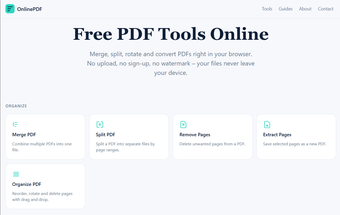
OnlinePDF is a free productivity web application that serves as a web-based solution with a set of tools for managing and editing PDF files. Through it, users will be able to perform simple edits and actions using just a web browser, without the need to install any software on their computers, making it more accessible and hassle-free.
Make simple changes to PDFs from anywhere
There are eight tools available in OnlinePDF that are divided into three categories. Organize enables you to split or merge files, as well as reorder pages, with options to remove or create a separate PDF document for some of them. Then there’s the Edit section, where you can rotate all or specific pages by 90, 180, or 270 degrees as you want.
Lastly, Covert will let you change images to PDFs and vice versa for other purposes. For the former, it supports JPG, PNG, and WebP, while the latter can be turned into either a PNG or JPG image. Having said that, compared to other similar solutions like UsePDFQuick, its offering is limited and not as extensive, so it won’t be ideal for those with more demanding needs and requirements.
Handy for simple edits
In conclusion, OnlinePDF does a decent job if you just need to perform quick and simple edits and conversions on your documents. It’s free and pretty much accessible from any web browser. However, if you’re more of a power user, you’ll be left wanting more given its limited feature set. Manage your expectations, and it will get the task done.